
Add live preview
LimitedRender access-checked drafts and receive unsaved form updates in a framework-agnostic frontend.
Ridu live preview has two complementary paths:
- a short-lived server capability lets the frontend fetch the saved, access-checked draft without receiving the author’s admin cookie;
- a browser channel sends the current unsaved form values from the admin to an iframe or popup.
Browser messages make editing feel immediate, but they do not grant API access and must not be persisted directly.
Before you configure it
Live preview is available for versioned collections and globals with drafts enabled. The document must already exist: the admin does not open a live-preview panel for an unsaved create form.
Versions: true,
VersionConfig: ridu.VersionConfig{
  Drafts: true,
},
Your preview frontend can run in any framework. It only needs a server-side Fetch-compatible client
for capability reads and, if you want unsaved updates, a browser that can use postMessage.
Configure the URL and viewports
Set Admin.LivePreview on the collection or global. A URL can be an absolute HTTP(S) URL or an
absolute path resolved against the admin origin.
Admin: ridu.CollectionAdmin{
  LivePreview: ridu.LivePreviewConfig{
    URL: "https://www.example.com/preview/{collection}/{id}?slug={field:slug}",
    Breakpoints: []ridu.PreviewBreakpoint{
      {Name: "mobile", Label: "Mobile", Width: 390, Height: 844},
      {Name: "tablet", Label: "Tablet", Width: 820, Height: 1180},
      {Name: "desktop", Label: "Desktop", Width: 1440, Height: 900},
    },
  },
},
The URL template accepts:
| Placeholder | Value |
|---|---|
{id} |
Current document ID |
{collection} |
Collection or global slug used by the admin route |
{field:path.to.value} |
Current scalar form value at a stored field path |
Values are URL-encoded. Non-scalar or missing field values become an empty string. ridu check
rejects unknown stored paths, unsupported placeholders, malformed braces, non-HTTP absolute URLs,
duplicate breakpoint names, and non-positive dimensions. Breakpoint names are unique lowercase
kebab-case; an omitted label is humanized from the name.
When the panel opens, the admin adds two reserved query parameters:
__ridu_previewidentifies the browser message channel;__ridu_preview_tokencarries the short-lived read capability.
Preserve both parameters through application redirects.
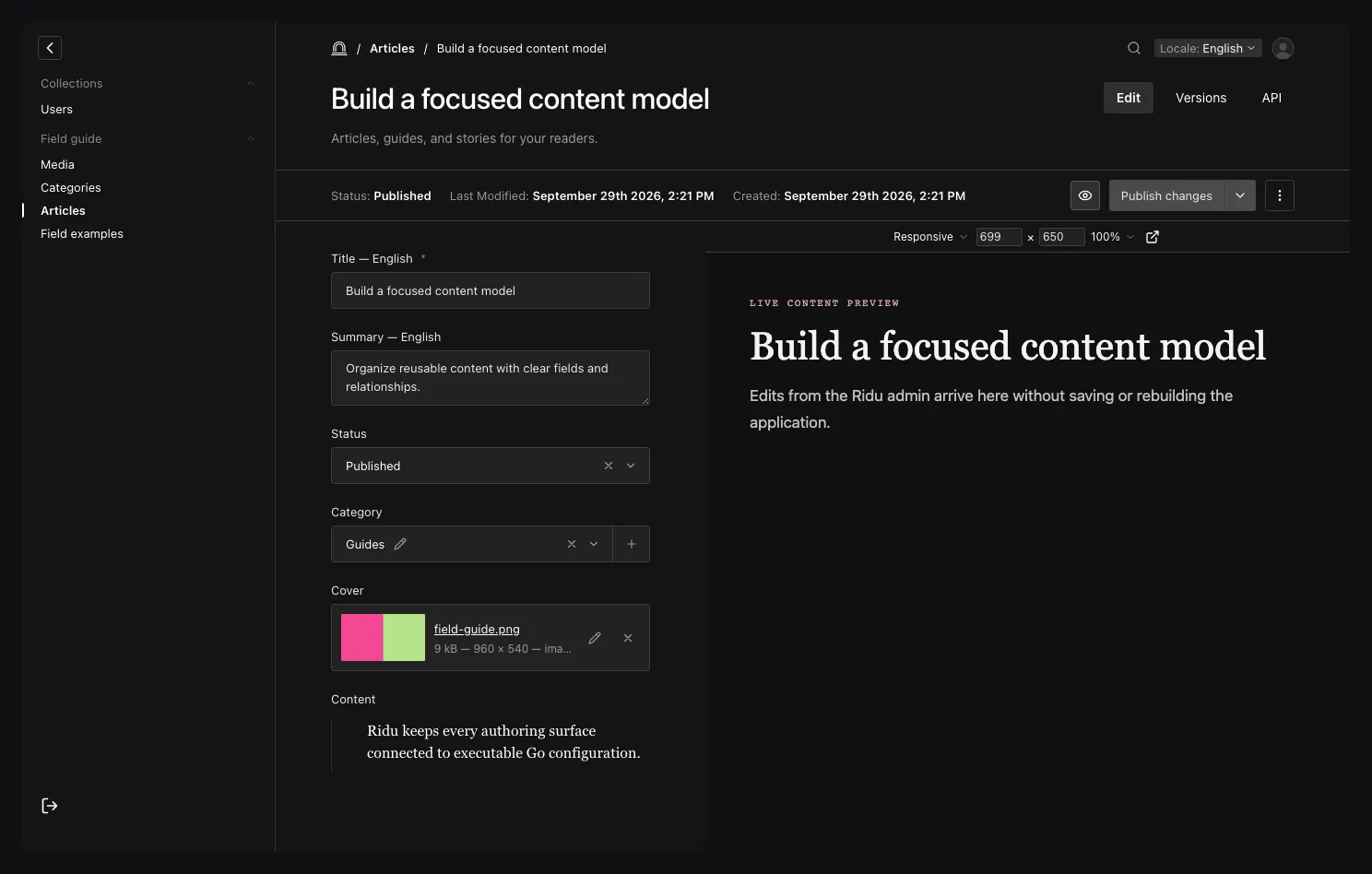
The panel reads the saved draft with a scoped capability and receives unsaved form updates through a validated browser channel.
In the editor, open Live Preview and choose a named breakpoint or Responsive from the viewport menu. Responsive uses the space available in the panel. Enter a width or height to switch to a custom viewport, or change the zoom to inspect a large layout in a smaller panel. These controls only resize the iframe; they do not change the document or the frontend’s own responsive rules. Open preview window uses the same live updates in a separate window.
Read the saved draft on the server
Use the generated client from your application frontend. It sends the preview token as a bearer credential to the dedicated read-only route; it does not forward the admin session.
import { createClient } from '@riducms/sdk';
import type { RiduConfig } from '~/generated/ridu.generated';

const ridu = createClient<RiduConfig>({
  baseURL: 'https://cms.example.com',
  credentials: 'omit'
});

export async function load({ params, url, setHeaders }) {
  const token = url.searchParams.get('__ridu_preview_token');
  if (!token)
    throw new Response('Missing preview capability', { status: 401 });

  setHeaders({
    'cache-control': 'private, no-store',
    'x-robots-tag': 'noindex, nofollow'
  });

  return {
    post: await ridu.preview('posts', params.id, token)
  };
}
For a global, call ridu.previewGlobal('site-settings', token). The corresponding authenticated
minting methods are createPreviewToken and createGlobalPreviewToken; custom admin tools should
normally let the built-in panel own minting and cleanup.
Every preview read checks the current actor, access predicates, field redaction, computed values, hooks, and document identity. Deleting or recreating the actor or target invalidates the grant instead of transferring it to a reused ID.
Receive unsaved form updates
Install the receiver in the preview page’s browser code. Pass the expected admin origin and resource identity.
import { connectLivePreview } from '@riducms/sdk';
import type { Posts } from '~/generated/ridu.generated';

export function connectPostPreview(
  id: string,
  onPost: (post: Posts) => void
) {
  const connection = connectLivePreview<Posts>({
    adminOrigin: 'https://cms.example.com',
    target: { resource: 'collection', slug: 'posts', id },
    onUpdate({ data }) {
      onPost(data);
    }
  });

  return () => connection.disconnect();
}
connectLivePreview reads the channel from the current URL and rejects messages whose origin,
source window, channel, resource kind, slug, ID, sequence, or data shape does not match. It announces
readiness on connection and again after pageshow, focus, or network return. Call ready() after an
application-side route or renderer reset; call disconnect() when the preview component unmounts.
For globals, use a target such as:
{ resource: 'global', slug: 'site-settings', id: 'site-settings' }The message data is the admin’s current form state. It may contain values that have not passed server validation or hooks, so render it defensively and never persist it directly.
Cross-origin setup
If the frontend and CMS use different origins:
- if the browser itself exchanges the capability, add the frontend origin to
RIDU_ALLOWED_ORIGINS(orHandlerOptions.AllowedOrigins); - pass the exact CMS origin—not
*—toconnectLivePreview; - serve both applications over HTTPS;
- allow the preview page to be embedded by the CMS origin in its CSP
frame-ancestorspolicy; - keep the preview route out of shared caches and search indexes.
CORS controls cross-origin browser fetches; it does not apply to a server-side capability exchange.
The browser receiver separately validates postMessage origin and window identity, so configuring
CORS does not configure the message channel.
Capability lifecycle and limits
A preview token is opaque, read-only, and valid for five minutes. It is bound to one authenticated actor collection, actor instance, resource kind, slug, and exact document. It cannot authenticate ordinary REST calls or preview a different target.
Ridu bounds the in-memory registry to 64 active tokens per actor and 4,096 per application process.
Minting beyond either limit returns rate_limited. Expired grants are discarded, and the built-in
admin revokes a superseded token and its current token when the panel exits. If a custom tool mints
tokens, call revokePreviewToken(token) when its session ends; revocation is idempotent for a token
that is already absent.
Keep tokens out of logs and caches
The token appears in the preview URL so the server-rendered frontend can exchange it. Treat it as a short-lived bearer secret:
- redact
__ridu_preview_tokenfrom CDN, proxy, application, analytics, and error-reporting logs; - do not persist it in browser storage or forward it to another service;
- set a restrictive
Referrer-Policyon the preview page; - avoid third-party scripts and assets that can observe the full page URL;
- return
Cache-Control: private, no-storefrom the frontend as well as relying on Ridu’s no-store API response; - revoke tokens created by custom tools as soon as the preview closes.
Troubleshoot the connection
| Symptom | Check |
|---|---|
| The Live Preview button is absent | The document must already exist, Admin.LivePreview.URL must resolve, and versions plus drafts must be enabled. |
bad_operation while minting |
Live preview or drafts are not configured for that resource. |
invalid_preview_token |
The token is missing, expired, revoked, scoped to another target, on another replica, or its actor/target identity changed. |
rate_limited while opening panels |
Close stale custom preview sessions and verify custom tools revoke their tokens. |
| The saved draft loads but typing does not update | Preserve __ridu_preview, run connectLivePreview in the browser, and verify the exact CMS origin and target identity. |
| The iframe is blocked | Update the frontend CSP frame-ancestors rule for the CMS origin. |
| The request is rejected cross-origin | Add the frontend origin to Ridu’s allowed origins; do not use an origin with a path. |
| Preview works on one replica only | Configure affinity for mint and read requests. |
See the TypeScript SDK for all preview methods, the
drafts and versions guide for the underlying document states, and the
@riducms/sdk reference for the receiver contract.